PharosWatchBot
Stablecoin risk alerts in your Telegram chat, free for all 384 active stablecoins. Five alert types watch every peg. Urgent moves arrive live; smaller ones wait for one daily message.
Live adoption
Active watchers
Alert families
What lands in your chat
Five alert types, each with its own evidence. Pick one to see the exact message the bot sends.
DEWS Threat Level
DEWS, the Depeg Early Warning System, scores stress before a peg breaks. Sent live for coins you follow when a coin holds a worse stress level for about an hour; calmer readings, and market-wide DEWS under All stablecoins, go in the daily Changes message.


🟠 USDT early-warning stress rose to WARNING (58/100, was ALERT) Main drivers: Pool Balance Drift 71, Supply Velocity 64 Via USD Top 25 · stress alerts View on Pharos: pharos.watch/stablecoin/usdt-tether
Depeg Events
Sent live when a peg moves past your step (1%, 2.5% or 5%), again each time it gets worse, and when it recovers. Depegs never count toward the daily limit.
▼ USDC lost its peg: $0.9880, 1.2% below $1.00 Via USD Top 25 · depeg alerts View on Pharos: pharos.watch/stablecoin/usdc-circle
Safety Grade Changes
Sent live only for a severe downgrade, held for 6 hours: two or more steps (B to C+, say) or a fall into D or F. At most once a day per coin. Smaller moves and upgrades go in the daily Changes message.
USDR Safety grade downgraded to D (was B) Why: Exit score fell from 72 to 35. Exit measures how easily holders can redeem or sell near $1. Overall score 44 (was 70) Via your watchlist · Safety alerts View on Pharos: pharos.watch/stablecoin/usdr-tangible
Reserve Drift
Tells you when the live reserve data for a coin stops matching its last reviewed mix. Only for coins with live reserve tracking, and it is sent live when first detected.
USDC reserves no longer match their reviewed profile Pharos's live reserve data for Circle USD Coin now differs from the last reviewed mix. Details on the coin page. Via your watchlist · reserve alerts View on Pharos: pharos.watch/stablecoin/usdc-circle
Freeze and Blacklist Events
An issuer froze, released or destroyed tokens at an address. Destroys, and freezes or releases of $1M or more, arrive live; smaller ones come in an hourly batch. Off unless you turn it on for a coin.
USDC issuer froze an address on Ethereum holding $1,000,000 Recorded by Pharos FreezeWatch Via your watchlist · freeze alerts View on Pharos: pharos.watch/stablecoin/usdc-circle
How it works
Start in two minutes
One useful default now. Adjust only when you need to.
01Open @PharosWatchBot
Send /start in a private chat. A group works too; there, only admins can change settings.
02Follow the top 25 in one tap
Depeg and stress alerts for the 25 largest USD stablecoins, updated as the market moves.
03Adjust in Manage Alerts
Add or drop coins, set quiet hours, or pause. Changes save as you make them.
Low noise
Quiet by default
Few live alerts, one daily summary, and a one-tap way to turn anything down.
Live only when it matters
Depegs, rising stress, severe downgrades and freezes of $1M or more.
One daily Changes message
Smaller grade moves, together at 09:00 UTC unless you set a time zone. Nothing changed, no message.
At most 6 a day
Outside depegs, at most 6 live alerts a day. The rest wait for the Changes message.
Fewer like this
Under every alert: mute the coin for 24 hours, pause all for 4, or turn that alert type down.
Quiet hours and pause
Silence nights in your timezone, or pause for 1, 4 or 24 hours.
Group watch desks
Add the bot to a group to share alerts. Admins choose what it follows.
Mini App
Manage Alerts, without typing commands
Tap Manage Alerts under any alert or next to the message box. One screen shows your coins and how quiet things are.

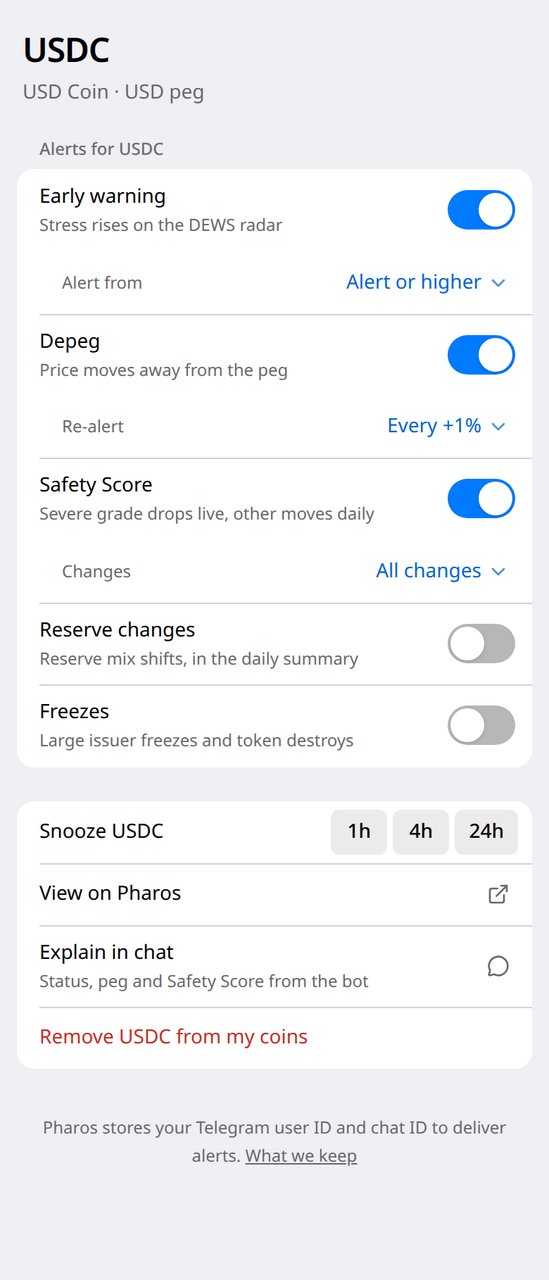
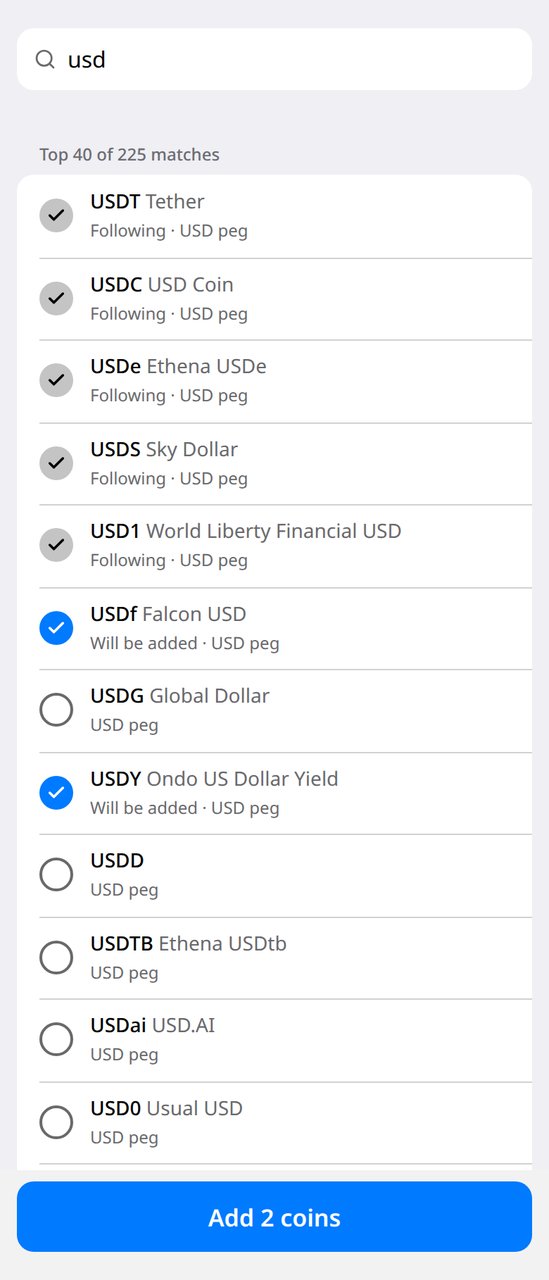

Also on Telegram
Market-wide reads, no setup
Daily Digest@pharoswatch
Daily market digest, AI-written from the same signals, including new stablecoin launches. Browse the archive.
Community@pharoswatchers
Open chat where watchers compare notes on fresh depegs and risk signals.
Commands
A short command list
Everything also works from Manage Alerts. Type / in Telegram to open the menu.
In the menu
/start- Follow the 25 largest USD stablecoins in one tap, or choose your own coins
/status- What you follow, whether alerts are on, and active depegs
/status <ticker>- Peg, stress level and Safety grade for one coin
/list- Presets and coins you follow, quiet hours and pause
/subscribe <targets>- Follow coins or a preset for depeg and stress alerts
/subscribe <types> <targets>- Choose alert types (dews, depeg, safety, reserve, freeze); presets support dews, depeg and safety
/settings- Open alert settings (in groups, an inline settings keyboard)
/pause [1h|4h|24h|off]- Hold all alerts until you resume, or for a set time
/help- Short command list
Typed only
(3)
/unsubscribe <targets>- Stop following coins or a preset
/unsubscribe all- Remove every follow and global alert in this chat
/forget- Delete everything Pharos Watch stores about this chat
- In groups, address commands to the bot, as in /subscribe@PharosWatchBot usd-top25. Groups get status, list, subscribe, settings and help.
Frequently asked questions
Is PharosWatchBot free?
Yes. Every alert type, preset, group feature and setting is free. Pharos is donor-funded; see the funding page if you want to support it.
What alerts does Pharos send on Telegram?
Live alerts cover depegs and recoveries, rising DEWS stress, severe safety-grade downgrades, reserve drift, and freezes or destroys of $1M or more. Smaller safety moves are grouped into one daily Changes message at 09:00 UTC unless you set a time zone, sent only when something changed. Smaller freezes come in an hourly batch.
How many messages will I get?
Very few on a normal day. Outside depegs, a chat gets at most 6 live alerts a day; anything past that waits for the daily Changes message. Every alert has Mute 24h, Pause all 4h and Fewer like this buttons, and quiet hours keep nights silent.
Where do alerts land: DM or group?
Alerts go to the chat where you set them up. Message the bot for personal alerts, or add @PharosWatchBot to a Telegram group for a shared watch desk. In a group, only admins can change what it follows.
Do I have to type commands?
No. Tap Manage Alerts, under any alert or next to the message box, to open the Mini App: add coins, set quiet hours and pause in a few taps. Commands such as /status USDC still work, and both share the same setup.
What are presets?
Presets are ready-made coin lists such as USD Top 25. Following one keeps up with the market: when a coin joins or leaves the list, your alerts follow. Add one from the Mini App or send /subscribe usd-top25.
Can I follow every active stablecoin at once?
Yes. Send /subscribe depeg all, or turn on All stablecoins in the Mini App. Market-wide safety and DEWS changes are grouped into the daily Changes message so the whole market does not page you.
Can I rely on it as an emergency pager?
No. Alerts are a bounded notification service, not a guaranteed emergency pager. Pharos checks for new alerts every 5 minutes; an alert that cannot be delivered within 2 hours is dropped rather than sent late. Each message links to Pharos so you can check the signal yourself.
What does Pharos store about my chat?
Your chat ID, optional username, the coins and presets you follow, alert settings, quiet hours, pause state, and short-lived delivery records. Public adoption figures are aggregate counts, and small daily changes are hidden so no single chat can be identified.
How do I stop alerts or delete my data?
Send /pause to stop alerts for a while, or /unsubscribe all to stop them for good. In a private chat, /forget deletes everything Pharos stores about that chat. Inactive unsubscribed chats are removed after 180 days.
Start getting alerts
Follow the top 25 in one tap, and the next depeg or downgrade has somewhere to land.